
Studying without a proper plan can make you feel confused and stressed.
You may spend hours studying but still feel that you haven’t covered enough.
This is where ChatGPT can help.
You can use ChatGPT to create a study plan based on your subjects, exam date, available time, and learning goals.
The best part?
You don’t need to be an expert. You just need to give ChatGPT the right information.
🎯 Why Use ChatGPT for a Study Plan?
ChatGPT can help you:
- Organize your subjects
- Divide your syllabus into smaller tasks
- Create daily study schedules
- Plan revision
- Add breaks
- Create practice sessions
- Adjust your plan when you miss a day
Instead of asking:
❌ “Make me a study plan.”
Give it more information.
🧠 Step 1: Tell ChatGPT Your Goal
First, explain what you want to achieve.
Example Prompt:
“I have my Class 12 exams in 45 days. I want to complete my syllabus and revise everything before my exams. Help me create a realistic study plan.”
The more specific your goal is, the more useful the plan can be.
📚 Step 2: Give Your Subject Details
Tell ChatGPT which subjects you have and which ones are difficult for you.
Example:
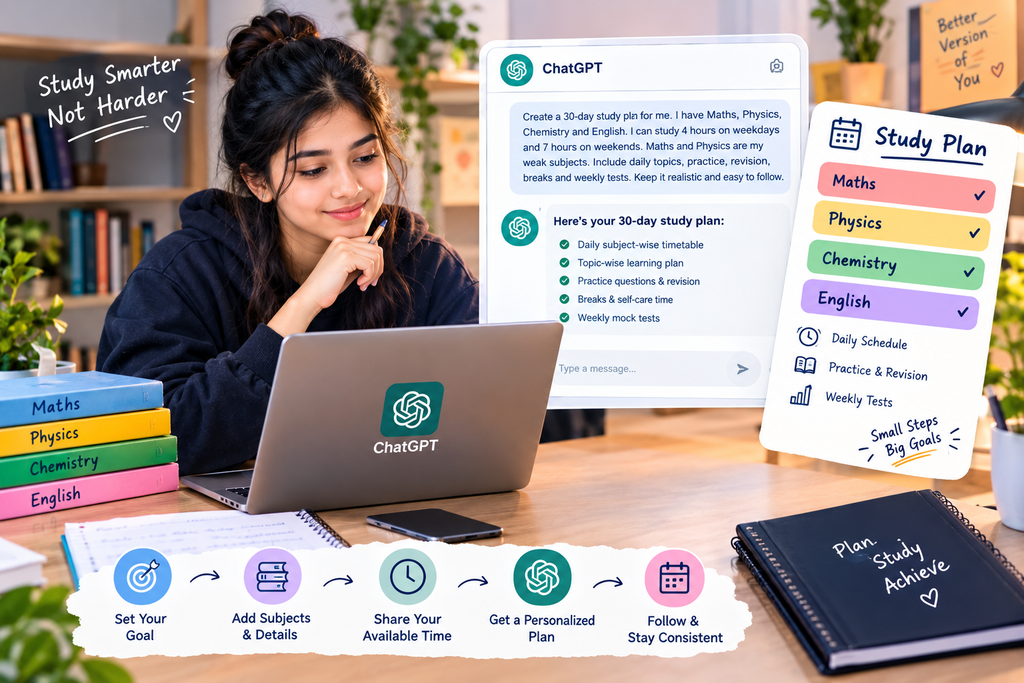
“My subjects are Maths, Physics, Chemistry and English. Maths and Physics are difficult for me, while English is easier.”
Now ChatGPT can suggest more time for difficult subjects.
⏰ Step 3: Tell It Your Available Time
Don’t create a plan that you cannot actually follow.
Tell ChatGPT how much time you have.
Example:
“I can study 4 hours on weekdays and 7 hours on weekends. I also need time for school and breaks.”
This makes your plan more realistic.
🗓️ Step 4: Ask for a Daily Plan
Now combine your information into one prompt.
Copy-Paste Prompt:
“Create a 30-day study plan for me. I have Maths, Physics, Chemistry and English. I can study 4 hours on weekdays and 7 hours on weekends. Maths and Physics are my weak subjects. Include daily topics, revision, practice questions and breaks. Keep the plan realistic and easy to follow.”
ChatGPT can then organize your study time into daily tasks.
🔄 Step 5: Add Revision
Don’t spend all your time learning new topics.
Your plan should include:
Learn → Practice → Revise → Test
You can ask:
“Add weekly revision and mock tests to my study plan.”
This helps you check what you actually remember.
📝 Step 6: Use ChatGPT When You Miss a Day
Missed today’s study target?
Don’t throw away your entire schedule.
Simply tell ChatGPT:
“I missed today’s study plan. Adjust the remaining schedule without making my daily study time too difficult.”
It can help reorganize the remaining tasks.
💡 Step 7: Use ChatGPT Beyond Planning
Once your study plan is ready, you can also use ChatGPT for:
📖 Understanding
“Explain photosynthesis in simple language.”
❓ Practice
“Give me 10 questions on this topic.”
🔍 Revision
“Create a quick revision quiz from this chapter.”
🧠 Active Recall
“Ask me questions one by one and wait for my answer.”
📋 Summary
“Create a short revision summary of this topic.”
⚠️ Don’t Make This Mistake
Don’t blindly follow everything ChatGPT suggests.
Your study plan should fit your:
- School/college schedule
- Exam syllabus
- Learning speed
- Energy levels
- Other responsibilities
Also, verify important academic information with your textbook, teacher, or official study material.
ChatGPT should be your study assistant—not a replacement for learning.
🚀 Best ChatGPT Study Prompt
If you want one simple prompt, try this:
“Act as my study planner. I am a [class/year] student preparing for [exam]. My subjects are [subjects]. My exam is in [number] days. I can study [hours] per day. My strongest subjects are [subjects] and my weakest are [subjects]. Create a realistic daily study plan with learning, practice, revision, breaks and weekly tests. Keep it simple and achievable.”
✅ Final Thoughts
ChatGPT can make study planning much easier when you give it the right information.
Don’t ask it to simply “make a timetable.”
Tell it your goal, subjects, available time, weak areas and exam date.
Then use the plan as a guide and adjust it according to your actual progress.
Remember:
Plan → Study → Practice → Revise → Test → Improve
A good study plan isn’t the one that looks perfect.
It’s the one you can actually follow.